2. Launching Accounts
Two account types
RuneScape has two login systems. Both run directly from the BotWithUs loader — the only difference is how the loader gets hold of your accounts.
| Account type | How you log in normally | What you'll do here |
|---|---|---|
| Classic | Username + password directly into the game | Save credentials in the account manager, then create a session |
| Launcher | The launcher → click an account tile | Have the launcher open so the loader can pull your accounts in, then create a session |
If you're not sure which you have: if you log in through the launcher, it's a launcher account.
Launching a classic account
This is the simpler path.
- In the loader, open the Account Manager (button on the toolbar).
- Click Add account and enter your username and password.
- You can leave credentials blank, but autologin won't work if you do.
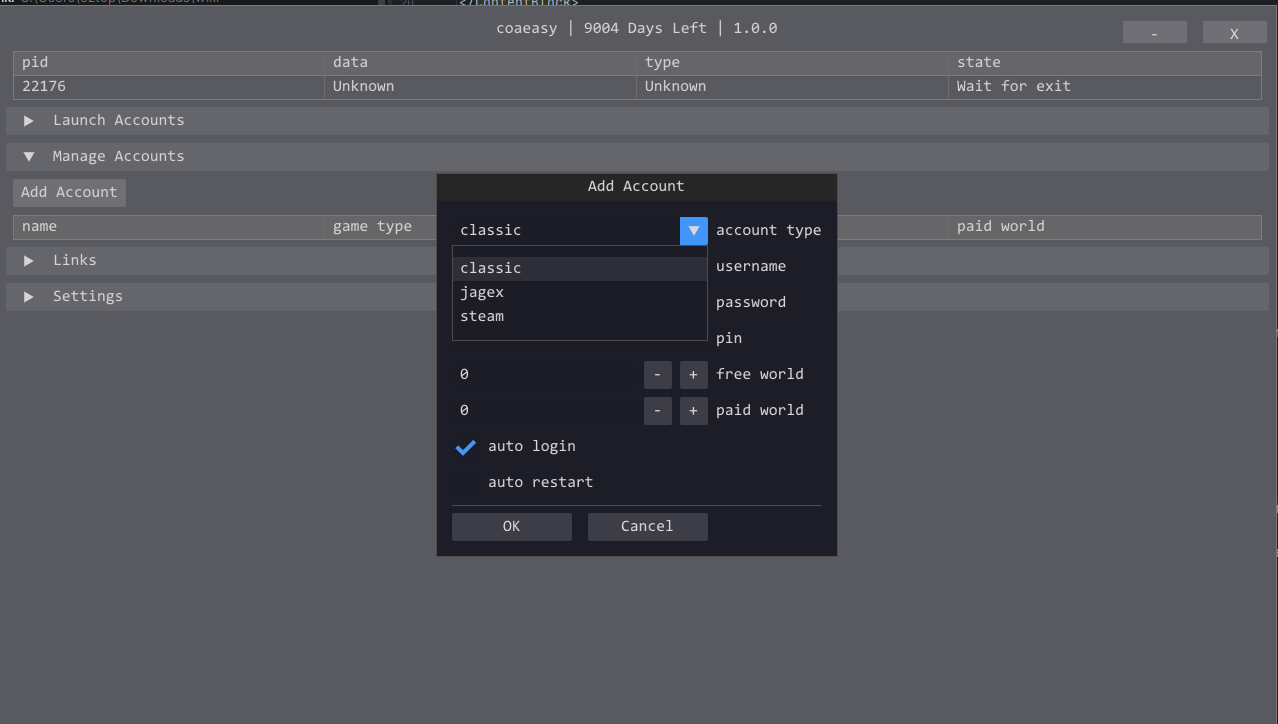
- Save the entry.
- Back on the main loader screen, click Launch account then select classic or launcher.
- Choose your saved account from the list.
- Click Launch session.
A game client window opens. After about 5 seconds, BotWithUs injects into it. You'll know injection succeeded when the BotWithUs logo appears in the corner of the client — this is a prerequisite for opening the bot menu in chapter 3.

Launching a launcher account
Launcher accounts can't store credentials inside the loader — the launcher handles that. The loader pulls your accounts straight from the launcher, so it just needs to be open in the background.
- Open the launcher and sign in.
- Switch to the BotWithUs loader.
- Click Add account, and select the account type.
- Click Clear and repopulate — the loader will re-read your accounts from the Jagex Launcher.
- Click Launch session.
The loader starts the client and BWU injects. It may take up to 10 seconds for the loader overlay to show in-game.
Session limits
- Your basic subscription allows for 2 sessions, any additional session can be purchased on the website if you want to bot more accounts at the same time.
- Closing the client frees a slot.
Next: the bot menu →